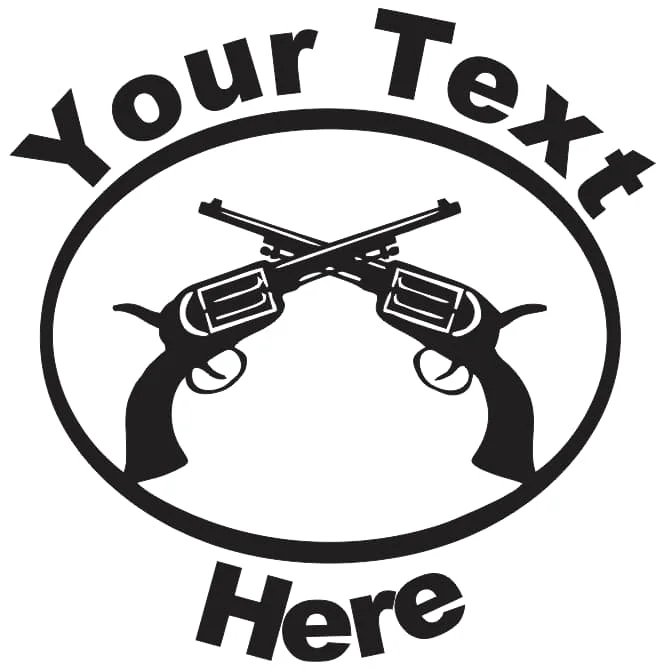
This Crossed Pistols Emblem design is optimized for CNC laser cutting and comes in RAR vector format. Cut it on wood, MDF, or acrylic using LightBurn, AutoCAD, or CorelDRAW for precise results.
⬇ Download Free CNC File
✔ Free · ✔ Instant · ✔ Personal & Commercial Use
About This Design
This striking crossed pistols emblem features two detailed revolvers positioned in an X-formation within a bold oval border. The design showcases classic western-style revolvers with clearly defined cylinders, triggers, and grips, creating an authentic vintage appearance. The oval frame is designed with curved text areas at the top and bottom, displaying placeholder text that can be easily customized for your specific needs. The entire design maintains clean, bold lines that are perfectly optimized for CNC cutting and laser engraving, ensuring crisp edges and professional results across various materials.
Key Features
The design combines symmetrical crossed revolvers with customizable text areas, making it versatile for multiple applications. Bold, thick outlines ensure excellent cutting performance while maintaining structural integrity. The oval border provides a professional finished look and serves as a perfect frame for the central crossed pistols motif. The scalable vector design maintains quality at any size, from small badges to large wall signs.
Compatible Materials
This design works exceptionally well with wood materials including pine, oak, and maple in thicknesses from 3-12mm. MDF and plywood provide smooth, consistent cuts for professional signage applications. Acrylic sheets (2-6mm) create stunning illuminated displays when backlit. The design also cuts beautifully in leather for patches and badges, while metal cutting (steel, aluminum) produces durable industrial-grade emblems perfect for outdoor applications.
Use Cases & Applications
Perfect for western-themed home decor, gun club logos, shooting range signage, and custom business emblems. Create personalized wall art for man caves, garage workshops, or western-style restaurants. Ideal for custom patches, belt buckle designs, and promotional merchandise. Event planners can use this for western party decorations, rodeo signage, or themed wedding accessories. Commercial applications include custom signs for firearms dealers, hunting lodges, security companies, and military unit insignia.
File Formats & Software
Download includes comprehensive RAR package with DXF, SVG, and CDR formats for maximum compatibility. Works seamlessly with LightBurn for laser cutting operations, AutoCAD for precision editing, CorelDRAW for graphic customization, and Inkscape for free vector editing. Simply extract files, import into your preferred software, customize text areas as needed, and send directly to your CNC router or laser cutter.
Free Download & License
Available for instant free download at hdidan.io with no registration required. Simply click download and receive immediate access to all file formats. Licensed for both personal and commercial use, allowing you to create products for sale or business applications. Perfect for entrepreneurs, hobbyists, and professional fabricators looking for high-quality CNC designs without licensing restrictions or ongoing fees.
Discover premium crossed pistols CNC designs perfect for laser cutting and CNC routing applications. Our free DXF SVG CDR files provide professional-quality western emblem templates suitable for wood, acrylic, and metal fabrication. Download instantly from hdidan.io’s extensive collection of CNC router files, featuring optimized vector graphics for clean cuts and precise engraving results across multiple material types and thicknesses.
🖼 Preview
Download — Click the button above. Instant free access.
Open — Import into LightBurn, AutoCAD, CorelDRAW, or Inkscape.
Scale — Resize to match your material dimensions.
Cut — Set machine parameters and start cutting on wood, MDF, acrylic, or metal.
More Other Designs
 RAR FREE
 RAR FREE
 ZIP FREE
 ZIP FREE
 RAR FREE
 DXF FREE
 RAR FREE
 RAR FREE