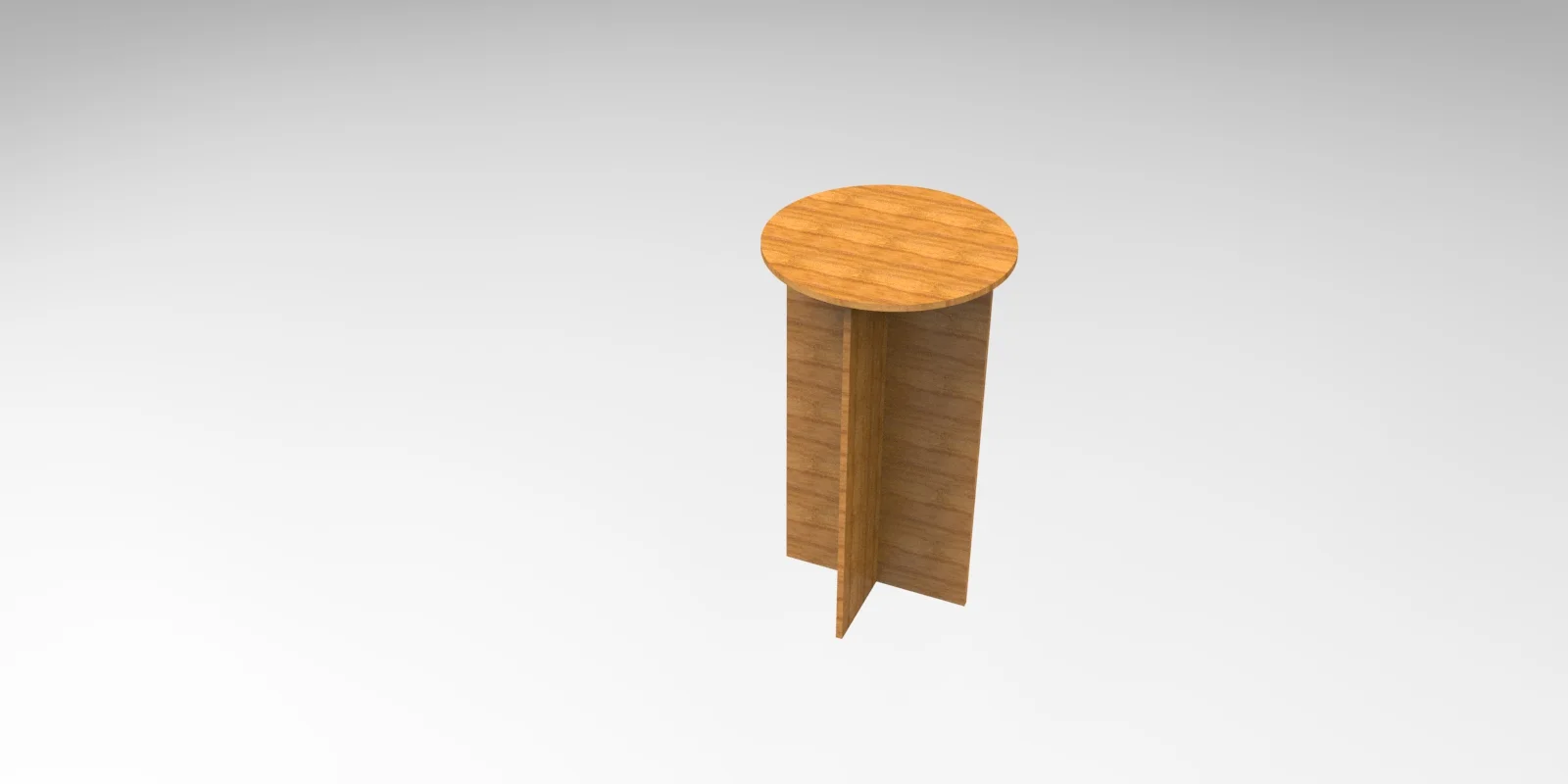
This Round Stool Side Table design is optimized for CNC laser cutting and comes in DXF vector format. Cut it on wood, MDF, or acrylic using LightBurn, AutoCAD, or CorelDRAW for precise results.
⬇ Download Free CNC File
✔ Free · ✔ Instant · ✔ Personal & Commercial Use
About This Design
This elegant round stool design features a perfectly circular tabletop supported by a distinctive cross-shaped base structure. The design showcases clean, minimalist lines with two perpendicular panels that intersect to form a stable four-point support system. The circular top displays beautiful wood grain patterns, while the vertical support panels create an open, airy appearance. The geometric simplicity of this design makes it versatile for both modern and traditional interior settings, with the cross-base providing excellent stability and visual interest.
Key Features
The standout feature of this design is its innovative cross-base construction that eliminates the need for complex joinery or additional hardware. The interlocking panel system creates maximum stability with minimal material usage. The smooth circular top provides ample surface area while maintaining a compact footprint. The open base design prevents visual clutter and allows light to flow freely around the piece, making spaces appear larger and more open.
Compatible Materials
This design works exceptionally well with various wood materials including plywood, MDF, hardwood, and particle board in thicknesses ranging from 12mm to 20mm. The clean lines also translate beautifully to acrylic sheets for a modern transparent look, or metal sheets for industrial applications. When cutting wood materials, ensure proper feed rates to prevent burning on curved edges. For plywood, seal edges after cutting to prevent delamination and achieve professional finishing results.
Use Cases & Applications
Perfect for creating side tables, plant stands, extra seating, or accent pieces for living rooms, bedrooms, offices, and commercial spaces. Ideal for DIY furniture enthusiasts, woodworking projects, interior designers, and furniture makers. Great for student housing, small apartments, or anywhere space-efficient furniture is needed. Can be customized in different sizes for children’s furniture, display stands for retail environments, or outdoor patio furniture when made from weather-resistant materials. Excellent for craft fairs, maker spaces, and woodworking businesses looking for popular, sellable designs.
File Formats & Software
Available in DXF format for maximum compatibility with CNC routers, laser cutters, and plasma cutting machines. Works seamlessly with popular software including LightBurn for laser cutting, AutoCAD for modifications, CorelDRAW for design adjustments, and Inkscape for vector editing. The clean vector paths ensure smooth cutting operations and can be easily scaled to different sizes while maintaining proper proportions and structural integrity throughout the design.
Free Download & License
Download this professional round stool design completely free from hdidan.io without any registration requirements or hidden fees. The file includes all necessary cutting patterns with clear assembly guidelines. Licensed for both personal DIY projects and commercial manufacturing, allowing you to create and sell finished products. Join thousands of makers who trust hdidan.io for high-quality CNC designs with instant download access and comprehensive technical support.
Discover premium free CNC files and laser cut designs at hdidan.io, your ultimate destination for professional DXF SVG CDR downloads. Our extensive collection of CNC router files includes furniture designs, decorative elements, and functional items perfect for woodworking enthusiasts, makers, and businesses. Each design is carefully crafted and tested to ensure optimal cutting performance across various materials and machines, providing exceptional value for both personal projects and commercial applications.
🖼 Preview
Download — Click the button above. Instant free access.
Open — Import into LightBurn, AutoCAD, CorelDRAW, or Inkscape.
Scale — Resize to match your material dimensions.
Cut — Set machine parameters and start cutting on wood, MDF, acrylic, or metal.
More Other Designs
 DXF FREE
 ZIP FREE
 RAR FREE
 ZIP FREE
 RAR FREE
 DXF FREE
 ZIP FREE
RAR FREE
ZIP FREE
RAR FREE