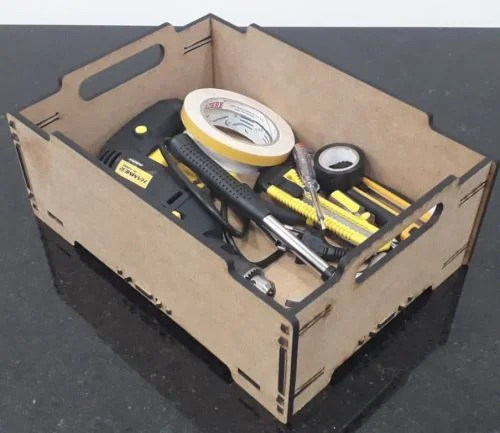
This Toolbox Storage Box design is optimized for CNC laser cutting and comes in ZIP vector format. Cut it on wood, MDF, or acrylic using LightBurn, AutoCAD, or CorelDRAW for precise results.
⬇ Download Free CNC File
✔ Free · ✔ Instant · ✔ Personal & Commercial Use
About This Design
This professional toolbox storage box design features a rectangular wooden container with practical carrying handles cut into the side panels. The laser-cut box showcases clean geometric lines with interlocking tab-and-slot construction for easy assembly without glue or fasteners. The design includes reinforced corner joints and a sturdy base panel that can support heavy tools and equipment. The side panels feature ergonomic oval-shaped cutout handles positioned for comfortable lifting and transport. The overall dimensions create a spacious interior perfect for organizing various tools, hardware, and workshop accessories.
Key Features
The design incorporates precision-engineered finger joints that create strong, durable connections between panels. The oval carrying handles are strategically positioned to provide balanced weight distribution when loaded with tools. The flat-pack design allows for efficient material usage and easy shipping or storage before assembly. All cutting lines are optimized for laser cutting with minimal waste and clean edges that require no additional finishing.
Compatible Materials
This toolbox design works excellently with 6-12mm plywood, MDF, or solid wood sheets. Birch plywood provides the best strength-to-weight ratio for tool storage applications. For lighter use, 3-6mm acrylic or wood veneer can be used. When cutting thicker materials, adjust laser power and speed settings accordingly. The finger joint tolerances are designed for materials up to 12mm thick, ensuring proper fit and structural integrity.
Use Cases & Applications
Perfect for workshop organization, this toolbox serves craftsmen, hobbyists, and professionals who need portable tool storage. Ideal for storing hand tools, screws, bolts, drill bits, and small hardware items. Makes an excellent gift for woodworkers, mechanics, or DIY enthusiasts. Can be customized with personal engravings or company logos. Also suitable for storing art supplies, craft materials, sewing notions, or as a decorative storage solution for any room. The clean design fits both workshop and home environments.
File Formats & Software
Download includes DXF, SVG, and CDR vector files in a convenient ZIP package. Compatible with all major CNC software including LightBurn, AutoCAD, CorelDRAW, Adobe Illustrator, and Inkscape. Simply import the file into your preferred software, scale to desired size, and send to your laser cutter. All cutting lines are properly layered and organized for efficient production workflow.
Free Download & License
Access this professional toolbox design absolutely free at hdidan.io with no registration required. Instant download provides immediate access to all file formats. Licensed for both personal and commercial use, allowing you to create products for sale or business applications. Join thousands of makers who trust hdidan.io for high-quality CNC and laser cutting designs. Download now and start creating professional storage solutions today.
Discover premium free CNC files and laser cut designs at hdidan.io, your trusted source for professional DXF SVG CDR downloads. Our extensive library of CNC router files includes furniture, storage solutions, decorative items, and functional designs perfect for woodworking projects. Download instantly and start creating with confidence using our precision-engineered laser cutting templates optimized for all skill levels.
🖼 Preview
Download — Click the button above. Instant free access.
Open — Import into LightBurn, AutoCAD, CorelDRAW, or Inkscape.
Scale — Resize to match your material dimensions.
Cut — Set machine parameters and start cutting on wood, MDF, acrylic, or metal.
More Other Designs
 RAR FREE
RAR FREE
RAR FREE
RAR FREE
RAR FREE
 RAR FREE
 RAR FREE
 ZIP FREE
 RAR FREE
 ZIP FREE