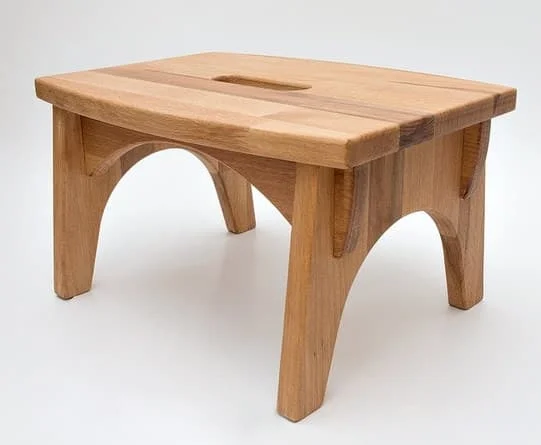
This Wooden Step Stool Footstool design is optimized for CNC laser cutting and comes in RAR vector format. Cut it on wood, MDF, or acrylic using LightBurn, AutoCAD, or CorelDRAW for precise results.
⬇ Download Free CNC File
✔ Free · ✔ Instant · ✔ Personal & Commercial Use
About This Design
This elegant wooden step stool design features a classic rectangular construction with distinctive arched cutouts on all four sides. The sturdy footstool showcases clean lines and traditional woodworking aesthetics, with a solid flat top surface that includes a convenient carrying handle cutout in the center. The four legs are connected by graceful arch-shaped reliefs that not only reduce material usage but also add visual lightness to the overall design. The proportions are carefully balanced, creating a functional piece that appears both robust and refined. The natural wood grain visible in the image highlights the organic beauty that this design will showcase when cut from quality lumber.
Key Features
The design incorporates several thoughtful elements including the central handle cutout for easy portability and the signature arched reliefs that serve both aesthetic and practical purposes. The geometric precision of the rectangular frame combined with the organic curves of the arches creates visual interest while maintaining structural integrity. The flat-pack design allows for efficient material usage and straightforward assembly, making it perfect for both novice and experienced woodworkers.
Compatible Materials
This step stool design works exceptionally well with various wood types including oak, pine, birch plywood, and MDF boards. Recommended thickness ranges from 15mm to 25mm for optimal strength and stability. The design also adapts beautifully to acrylic sheets for modern applications, or even thick leather for unique portable seating. When laser cutting, ensure proper ventilation for wood materials and adjust power settings according to material density for clean, precise edges.
Use Cases & Applications
This versatile step stool serves multiple purposes in homes, workshops, kitchens, and commercial spaces. Perfect as a bathroom step stool for children, kitchen helper for reaching high shelves, or workshop seating for detailed projects. The portable design makes it ideal for camping furniture, craft fair displays, or as a thoughtful handmade gift. Businesses can customize the design for branded promotional items, retail displays, or as part of furniture collections. The timeless aesthetic suits both modern and traditional interior design schemes.
File Formats & Software
The complete file package comes in RAR format containing DXF, SVG, and CDR versions for maximum compatibility. Works seamlessly with popular CNC software including LightBurn for laser cutting, AutoCAD for professional design modifications, CorelDRAW for graphic enhancements, and Inkscape for free vector editing. The clean vector paths ensure smooth cutting operations and easy scaling to different sizes while maintaining design integrity.
Free Download & License
Access this professional step stool design completely free at hdidan.io without registration requirements or hidden fees. The instant download provides immediate access to all file formats with generous licensing terms covering both personal DIY projects and commercial manufacturing applications. Whether you’re creating one piece for your home or producing multiple units for sale, this design offers exceptional value and quality for your CNC cutting projects.
Discover premium free CNC files and laser cut designs at hdidan.io, your ultimate destination for professional DXF SVG CDR downloads. Our extensive collection includes furniture patterns, decorative elements, and functional designs perfect for CNC router files and laser cutting projects. From intricate mandalas to practical furniture pieces, each design is carefully crafted for optimal cutting performance across various materials including wood, acrylic, and metal applications.
🖼 Preview
Download — Click the button above. Instant free access.
Open — Import into LightBurn, AutoCAD, CorelDRAW, or Inkscape.
Scale — Resize to match your material dimensions.
Cut — Set machine parameters and start cutting on wood, MDF, acrylic, or metal.
More Other Designs
 RAR FREE
 ZIP FREE
 RAR FREE
 RAR FREE
 DXF FREE
 RAR FREE
 RAR FREE
ZIP FREE
RAR FREE
ZIP FREE