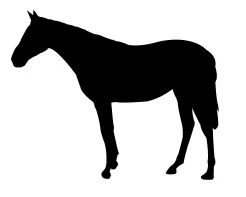
This Horse Silhouette design is optimized for CNC laser cutting and comes in DXF vector format. Cut it on wood, MDF, or acrylic using LightBurn, AutoCAD, or CorelDRAW for precise results.
⬇ Download Free CNC File
✔ Free · ✔ Instant · ✔ Personal & Commercial Use
About This Design
This stunning horse silhouette design features a beautifully proportioned equine profile captured in a clean, minimalist black silhouette style. The design showcases the classic horse anatomy with detailed attention to the graceful neck curve, distinctive pointed ears, flowing mane, and strong body structure. The silhouette maintains perfect balance with four legs positioned naturally, creating an elegant stance that embodies the majesty and grace of these magnificent animals. The smooth, continuous outline makes this design ideal for precision CNC laser cutting applications.
Key Features
The horse silhouette boasts clean vector lines with no internal details, making it perfect for single-pass cutting operations. The design maintains excellent proportions with recognizable horse characteristics including the refined head profile, arched neck, and balanced body structure. The solid black fill ensures high contrast visibility while the streamlined shape minimizes material waste during cutting operations, making it both economical and visually striking for various project applications.
Compatible Materials
This versatile horse design cuts beautifully across multiple materials including hardwood, softwood, MDF, plywood, birch, acrylic sheets, leather, cardboard, and thin metal sheets. Recommended thickness ranges from 3mm to 12mm depending on your laser power. For wood materials, use slower speeds to prevent charring edges. Acrylic cuts produce polished edges at moderate speeds, while leather requires lower power settings to avoid burning through delicate areas of the silhouette.
Use Cases & Applications
Perfect applications include rustic home decor, farmhouse wall art, equestrian-themed gifts, ranch signage, children’s room decorations, and horse stable displays. Create custom wooden plaques, acrylic ornaments, leather bookmarks, or metal garden stakes. Ideal for horse enthusiasts, riding schools, veterinary clinics, and equestrian events. Scale the design for large barn decorations or miniature craft projects. Combine with text elements for personalized name signs or inspirational quotes about horses and freedom.
File Formats & Software
Download includes high-quality DXF vector files compatible with all major CNC software including LightBurn, AutoCAD, CorelDRAW, Adobe Illustrator, and Inkscape. The clean vector paths ensure smooth cutting operations without jagged edges. Simply import the DXF file into your preferred software, adjust size and cutting parameters for your material, and send directly to your laser cutter or CNC router for precise results every time.
Free Download & License
Access this premium horse silhouette design completely free at hdidan.io without registration requirements or hidden fees. Instant download provides immediate access to professional-grade CNC files. Licensed for both personal crafting projects and commercial applications including small business products, craft fair items, and custom orders. Join thousands of makers who trust hdidan.io for quality laser cutting designs and expand your creative possibilities today.
Discover premium free CNC files and laser cut designs at hdidan.io, your ultimate destination for professional DXF SVG CDR downloads. Our extensive collection of CNC router files includes intricate mandalas, geometric patterns, animal silhouettes, and decorative elements perfect for woodworking, metal fabrication, and acrylic cutting projects. Each design is optimized for precision cutting with clean vector paths and detailed instructions for various materials and thicknesses.
🖼 Preview
Download — Click the button above. Instant free access.
Open — Import into LightBurn, AutoCAD, CorelDRAW, or Inkscape.
Scale — Resize to match your material dimensions.
Cut — Set machine parameters and start cutting on wood, MDF, acrylic, or metal.
More Other Designs
 ZIP FREE
 DXF FREE
 RAR FREE
 RAR FREE
 RAR FREE
 RAR FREE
 ZIP FREE
 ZIP FREE